
2 April 2021 · 8 min read
Still doing your reporting in Excel? Here are the 5 best reasons to leave your trusty old spreadsheets behind and switch to automated reporting.

Data plays an increasingly important role in companies across every industry. It now flows in from all directions. Faced with this mountain of data, information tends to get lost. You've probably noticed that you spend more and more time digging through databases. The problem is no longer so much collecting data, but making sense of it.
In their quest for information, managers quickly found an ally: Excel. Created in the mid-1980s, the tool has won over a large share of companies worldwide. According to a study on Office suite productivity, 82% of companies use Excel regularly.
That kind of success is easy to understand. Excel is a powerful tool with many strings to its bow. But as your database grows, things get complicated. Those are exactly the software's limits that we'll explore in more detail.
On the agenda: the 5 best reasons to stop reporting via Excel:
- Errors,
- Delays,
- The lack of advanced analysis,
- The difficulty of working as a team,
- The lack of data history

7 mistakes to avoid for successful reporting
✅ Every finance professional has made a reporting mistake at some point. Thanks to our more than 10,000 customer companies, we've gathered the most common mistakes for you.
❌Never make a mistake again by downloading this free ebook.

Errors you won't escape
Errors... errors everywhere!
More than 75% of managers are certain that their data is correct. That's the finding of an article published in "Les Echos Business", which looked at how much confidence managers have in their data. Yet according to the same article, our confidence in this data is "exaggerated". The University of Hawaii looked into the question. According to their research, nearly 9 out of 10 Excel files contain errors.
Linking the right cells, selecting the right data ranges, removing irrelevant information... If you use spreadsheets, you know how many of these small repetitive manipulations there are. And each of these mini-operations carries a risk of error. Multiply that by the number of cells in your file. The chances that no error has crept into your calculations are slim.
Good decisions require good information
The problem is that an error can quickly have serious consequences. A misplaced decimal point can lead you to underestimate certain factors. Your decisions may then be based on incorrect information. Nobody enjoys taking responsibility for a bad decision, and even less so when a typo is to blame.
The University of Southern Denmark has also studied the cost these errors can generate. The study cites several concrete consequences:
- Lower customer satisfaction,
- Higher operating costs,
- Inefficient decision-making processes,
- Lower performance,
- Reduced employee job satisfaction.
The conclusion is clear: the quality of your reporting and your decisions depends on the quality of your information. That's why you need to protect your documents from these errors.
Leave repetitive tasks behind
Good news: solutions exist! Most spreadsheet errors come from repetitive actions. Yet these are the operations that add the least value. Leave them to your computer and focus on what matters to you! Recurring tasks are its area of expertise. To get the most out of its capabilities, equip your computer with the right tools.
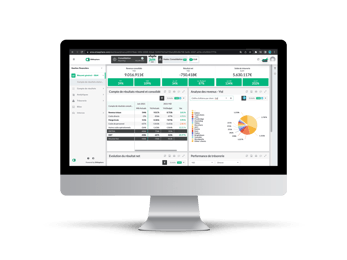
Take EMASPHERE, for example. Thanks to its advanced automation, the platform lets you stay focused on what brings the most value to your company. The solution was also designed by experts to be as reliable as possible, notably through automatic data synchronization. So you can be confident and leave errors behind.
Learn more about EMASPHERE's expertise →

Delays you will face
Was it AB12, or AB21?
You know the feeling. Watching the hours tick by while you're stuck in your spreadsheet. On top of generating errors, manual operations take a lot of time. They require you to:
- set up the analysis of your data,
- update your files very regularly,
- generate clear, complete reporting to share your findings,
- repeat the process for every report.
These tasks typically take up entire days for CFOs. A Brainyard study found that a CFO spends nearly 12 hours a week building spreadsheets. That's time not spent interpreting your data.
Your time is precious
Yet time is exactly what CFOs lack. That's the conclusion of an Accountemps study on the obstacles to CFO productivity. According to the study, lack of time is the factor that has the most negative impact on their projects. That's why it's essential to offload repetitive tasks.
Rather than spending your time in Excel, dedicate it to sharing your expertise. That way, you can focus on improving the quality of your reporting. And you'll reach your KPIs even faster.
Boost your productivity
To be more productive, equip yourself with effective tools. Take EMASPHERE, which offers a whole series of preconfigured dashboards. By letting you turn your data into useful management information, this tool saves you valuable time. You get to analyze and interpret results instead of producing reports.
Make life easier for yourself: rely on tailor-made features. For example, EMASPHERE can also automatically generate slide decks from your dashboards. With them, you're ready to brief your management committee in seconds!
Discover how to set up your dashboard with EMASPHERE →

Download our free ebook: 🤔 "How to build a dashboard" 🚀

Advanced analysis you'll have to do without
A priority for CFOs
According to a PwC study, performance management is CFOs' top priority. The study also notes that ever deeper analysis is expected of them. You'll increasingly need to run in-depth cross-analyses across your databases. These aim to reveal the complex links between your different departments. For example, you may need to put your operational and financial data into perspective. That's why cross-referencing your data is vital.
Juggling data is a challenge
Excel lets you run cross-analyses using pivot tables. If you've ever tried, you know that it can be a real balancing act. Excel simply wasn't designed to cross-reference different databases. Your options are therefore limited. The same goes for the depth of your analysis.
Simple, intuitive advanced analysis: it's possible!
Performance management platforms enable very advanced cross-analyses. Building KPIs by cross-referencing your data becomes fast and intuitive. For example, you can combine accounting data (such as revenue) with data from your CRM or ERP.
The EMASPHERE platform has a "drill-down" feature. With one click from your report, you can dig deeper into your data. Navigating your data becomes as easy as pie:
- Click on a chart or a figure.
- Instantly access the source data.
In short: access what you want, when you want.
Learn more about EMASPHERE's drill-down feature →
Teamwork you'll give up
The ordeal of collaborating in Excel
With the arrival of SharePoint, it became possible for several people to work on the same document. Yet working together on the same Excel file remains complicated. You run into problems with:
- synchronization,
- data deleted by colleagues,
- formulas corrupted by others,
- access rights that can't be configured (by department, hierarchy level, etc.).
All of these problems generate errors. These obstacles to collaboration put your data at risk:
- An accidental change can disrupt your analysis,
- Your data can fall into the wrong hands.
On top of that, keep in mind that there are as many ways to build an Excel file as there are users. Your habits aren't your team's habits. As a result, understanding an Excel file built by someone else can be a real challenge.
Collaboration can be simple
With EMASPHERE, by contrast, every user has their own personalized access. You can give your colleagues exactly the access they need. Information goes straight to where it will be most useful.
Collaboration takes on a whole new meaning:
- Everyone can work with the data as they wish,
- No one gets blocked by their colleagues' activity.
See how EMASPHERE can improve collaboration →

🤔 How do you stop racing against the clock as a CFO?
⏰ Discover the 4 time-optimization levers for CFOs in a free ebook.

Data history you'll be deprived of
Knowing where you come from to decide where you're going
Excel is a tool for manipulating data to create tables or charts. However, Excel was not built to be a database. That's why Excel keeps very little record of changes to your data. In other words, using Excel means risking the loss of your data history. Yet knowing where your figures come from lets you anticipate how they will evolve more accurately. As a study by the Université Catholique de Louvain explains:
"Data history makes it possible to understand certain events by comparing them across different periods. It is an important component in making business decisions. It allows certain data to be put back into context."
Boost your analysis with data history
With EMASPHERE, data history is within your reach. Navigate easily between periods. You now have a complete overview of your figures. You can even identify the causes of different financial movements. As a result, you know exactly what to do to reach your KPIs.
Learn more about data history in EMASPHERE →
Use the right tool
Let's recap! Your daily life as a finance expert is like a hike toward better performance for your company. You probably started out with a Swiss Army knife. Over time and with new challenges, that tool was no longer enough. Excel has the same limits. That's why it's time to change tools.
To best address these concerns, EMASPHERE is:
- Quick to set up,
- Able to grow with you,
- Preconfigured.
That's why EMASPHERE is the platform that will get you where you want to go.
In a word: don't be afraid to use the right tool to solve the right problem.
Has Engels' experience made you want to learn more about EMASPHERE?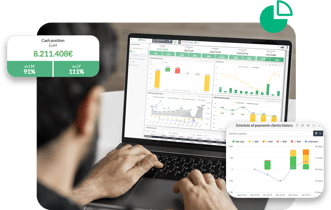
EMASPHERE is an automated reporting SaaS platform. Spend less time building your dashboards and more time analyzing them!



Rather talk it through with a human?
A first conversation, with no commitment, to see what your reporting could become.