
16 April 2021 · 8 min read
Understand reporting in 5 simple points: definition, types, must-have elements, tools and steps, with everything you need to roll it out in your organization.

Reporting is to a business what fresh water is to survival: non-negotiable.
But you still need to get your reporting set up right to tap into fresh, actionable data.
CFOs, CEOs and finance professionals with questions about reporting: this article is for you.
Together, we will cover:
- The definition of reporting;
- The types of reporting;
- The must-have elements of reporting;
- Useful reporting tools;
- The steps of reporting.
Reporting explained
Let's start at the very beginning: what reporting is and what it is used for.
What is reporting?
"Reporting" refers to communicating data. It includes:
- creating;
- publishing;
- and distributing actionable reports on a company's activities and performance.
- reports used to account for activity;
- analytical dashboards.
7 mistakes to avoid for successful reporting
❌ Every finance professional has made a reporting mistake at some point. Thanks to our more than 10,000 customer companies, we have gathered the most common mistakes for you.
✅ Never make a mistake again by downloading this free ebook.

The terms "reporting" and "dashboards" are often used interchangeably, even if loosely. That's because the concept behind both terms is the concise, visual representation of the performance of a company, a department, a communication channel, a project...
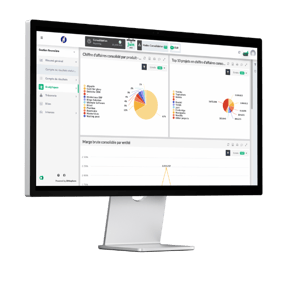
Reporting in the sense of a "dashboard" is therefore a tool. It compiles verified and verifiable data. It lets you visualize a company's performance indicators. Given the solution we have built around performance management, in this article we will use the term "reporting" to mean the visual representation of data in dashboard form.
It is also important to note that reporting centralizes data. The data it contains is first collected, then processed, before being formatted. Depending on the company's reporting maturity, this data may be:
- entered manually by teams;
- pulled from Excel files;
- or fed automatically from the systems already in place (accounting software, ERP, CRM, HRIS, ...).
In this article, we will approach reporting from an analytical perspective, as dashboards rather than as activity reports.
What is reporting used for?
Reporting has two main purposes:
- to be analyzed in order to steer strategic decisions;
- to guide managers and their teams toward the goals set beforehand.
Reporting structures data in a clear, accessible way. It presents information in various formats to make it more actionable.
Its format and frequency are set in advance. They vary according to the needs of your organization and your users.
Overall, reporting makes it possible to:
- pass strategic or operational information from one department to another;
- give the whole organization visibility on progress toward the goals that stem from its strategy;
- give more meaning to teams' work, since they can track their own progress.

What are the types of reporting?
Every organization has its own reporting, and every company its own needs. To help you choose yours, here is a selection of the most common types of reporting:
Strategic reporting
Strategic dashboards are useful to executive committees as well as to board members. Both groups need an overview rather than a detailed view.
This type of dashboard therefore gives C-levels an overview of company performance through indicators that cover the entire business.
Project reporting
You'll agree the name says it all. This type of reporting is used to monitor a project's progress. Inspired by agile development, it is useful both:
- to participants, who can see where they stand against the project milestones;
- to people indirectly involved in the project, who are kept informed of progress and performance at regular intervals.

How can you stop racing against the clock as a CFO? 🤔
⏰ Discover the 4 time-optimization levers for CFOs in a free ebook.

Analytical reporting
In other words, analytical reporting is reporting focused on the analyses it makes possible. Often associated with software solutions, it is closely related to business intelligence or Enterprise Performance Management (also called EPM).
We often talk about analytical reporting when a dashboard brings together a large amount of data and allows advanced analysis. This analytical approach to reporting is made possible in particular by cross-referencing source data or categorizing data into groups.
Within a company, analytical reporting includes indicators such as profitability by client or by project, or cost analysis.
Quite rightly, those of you most familiar with finance will associate analytical reporting with reporting based on cost accounting. Although this is a loose use of the term, it is completely understandable.
Operational reporting by department
To track progress toward its goals, each department may need to build its own operational reporting. These include:
- financial reporting;
- sales reporting;
- marketing reporting;
- HR (human resources) reporting;
- ...
Financial reporting
Financial reporting is one of the most iconic types of reporting. It comes in several forms. These include, for example, accounting reporting, cash management reporting, financial planning reporting and consolidation reporting.
Accounting reporting focuses on indicators related to the company's accounting health, such as DPO (days payable outstanding), average DSO (days sales outstanding) or EBITDA trends... Automated reporting software such as EMASPHERE can also generate balance sheets and income statements as part of this type of reporting.
Consolidation reporting, on the other hand, is built around reconciling accounts and intercompany transactions to obtain a consolidated view of a group that may be made up of dozens or even hundreds of entities.
Ideally, you should use specialized software that can drill down to the transaction itself and offer:
- multiple consolidation groups,
- intelligent assistance that can suggest matches.

Discover the KPIs every high-growth company should track to steer its growth! 🚀

Sales reporting
Reporting and sales are a well-known pair for any company that pays attention to its commercial performance. This type of reporting focuses on indicators such as:
- revenue;
- YtD or monthly sales volume;
- weighted pipeline value;
- conversion rate;
- average basket or ACV (Annual Contract Value);
- revenue breakdown by product, by sales rep, by region;
- etc.
CSR (corporate social responsibility)
More recent than the types of reporting mentioned above, this newcomer is also known as ESG reporting (Environmental, Social and Governance).
It focuses on the non-financial aspects of the company. It includes assessment criteria related to social, societal and environmental issues, with KPIs such as:
- the number of training sessions delivered;
- the local, economic and social impact of the company's activity;
- sustainable use of resources.
The must-have elements of reporting
The three essential elements of a successful reporting dashboard are:
- the menu;
- the context bar;
- the data visualization area.
The menu is made up of the pages you consult as needed. The menu lets you:
- navigate from page to page;
- organize information by theme.
Focus on what matters. We recommend limiting the amount of information shown per page. It makes it easier for readers to understand! In EMASPHERE, for example, the menu is fully customizable to the needs, rights and responsibilities of each user or user group.
The "data visualization" area brings together your KPIs, charts and tables.
This information usually comes with a comparison range. This comparison can be:
- over time (YtD vs. YtD-1, current month vs. previous month, budget vs. actuals, …)
- by industry: how does your performance compare with your market?
- within the company: between subsidiaries, products, regions…
Well-built reporting also lets you apply an individual filter to relevant charts. Take a chart showing the number of quotes issued each month over the last 12 months. Filtering this chart lets you display the number of signed quotes in a single click, for example. In EMASPHERE, you have a range of 50+ preconfigured KPIs, tables and charts for your indicators. The choice is yours!
The context bar lets you apply the filters you need and access the necessary settings.
It is essential to be able to apply global filters to your entire page rather than to individual charts. One of the most common filters, for example, is selecting a date range.
.png?width=514&name=Reporting-blogpost-screenshots%20(2).png)
Tools to build your reporting
Let's review two of the most common categories of reporting tools: spreadsheets and EPM solutions.
Spreadsheets, to get started
As we discussed in our article on Excel reporting, spreadsheets are one of the
great classics of business management. Google Sheets or Excel, for example, are good tools to start your reporting, especially if you are not afraid of:
- the risk of data entry errors;
- the time needed to keep your spreadsheets up to date.
EPM solutions, to become more efficient
EPM solutions (Enterprise Performance Management) offer a 360° view of the business. They give you visibility on all of the following at once:
- analytical reporting;
- consolidation;
- forecasting;
- and management simulations.
As we explained in our guide to choosing the right EPM, these solutions are powerful allies for finance departments and top management in general. When they truly meet your company's needs, they contribute to performance management.
In the case of EMASPHERE, an EPM solution:
- connects automatically to your specific tools;
- automates dashboard creation so you can focus on interpreting your reports;
- gives each profile access to the data it needs.
The steps of reporting
Reporting is generally built in three simple steps:
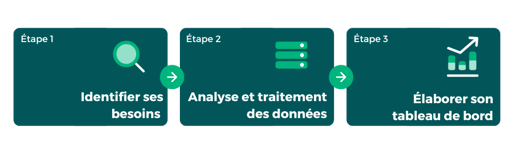
The three steps to setting up reporting
Identifying needs
This step is about taking into account the needs of:
- the organization, which must deal with strategic directions and constraints caused by existing tools;
- business teams, whose needs differ depending on use cases and departments;
- the executive committee, which expects reporting that provides actionable information.
When you build reporting, design it with your company's strategy in mind. Ask yourself: "What is my organization's strategic vision?" You can then define one or more appropriate goals using the SMART method (Specific, Measurable, Achievable, Realistic and Time-bound). Each goal can then be broken down into key performance indicators.
To learn more about the SMART method, download our ebook on the 7 reporting mistakes to avoid and discover our detailed tips!
Analyzing and processing data
Reporting relies on data. It can come from manual entries by teams or be fed from business tools. Either way, ask yourself about the quality of this data. To do so, consider these 4 points:
- Reliability: How accurate is the data entered or fed in?
- Volume: How much information does your reporting need to take into account?
- Format: Is the data coming from the different systems that feed your reporting in a consistent format?
- Calculation: Do the data need to be calculated to make the information usable?
Building your dashboard
For reporting to be fully actionable, it must:
- include metrics that are meaningful to the person reading it;
- use the clearest possible visual format for its purpose;
- be structured consistently.
To achieve reporting that meets these criteria, an iterative process is usually needed. It involves a period of fine-tuning the KPIs used and the models adopted.

Over to you
After reading this article, the fundamentals of reporting should hold no more secrets for you. Put your new knowledge into practice right now: create your reporting dashboard in three steps.

Download our free ebook: "How to build a dashboard" 📈





Rather talk it through with a human?
A first conversation, with no commitment, to see what your reporting could become.